Coming soon. Design partners onboarding now.

Stop watching the chart. Let your strategy place the trades.

AlgoDesk runs the strategies you already wrote for TradingView on CME futures, and sends every order to your broker or prop firm account. No rewrite, no server to look after.

  • One strategy across one account or many, each with its own rules
  • Prop-firm rules built in: flat-by time, no entries after, daily loss cap
  • Practice first, then paper, then live when you're ready

Plans from $19 a month. Free for design partners during early access. See plans

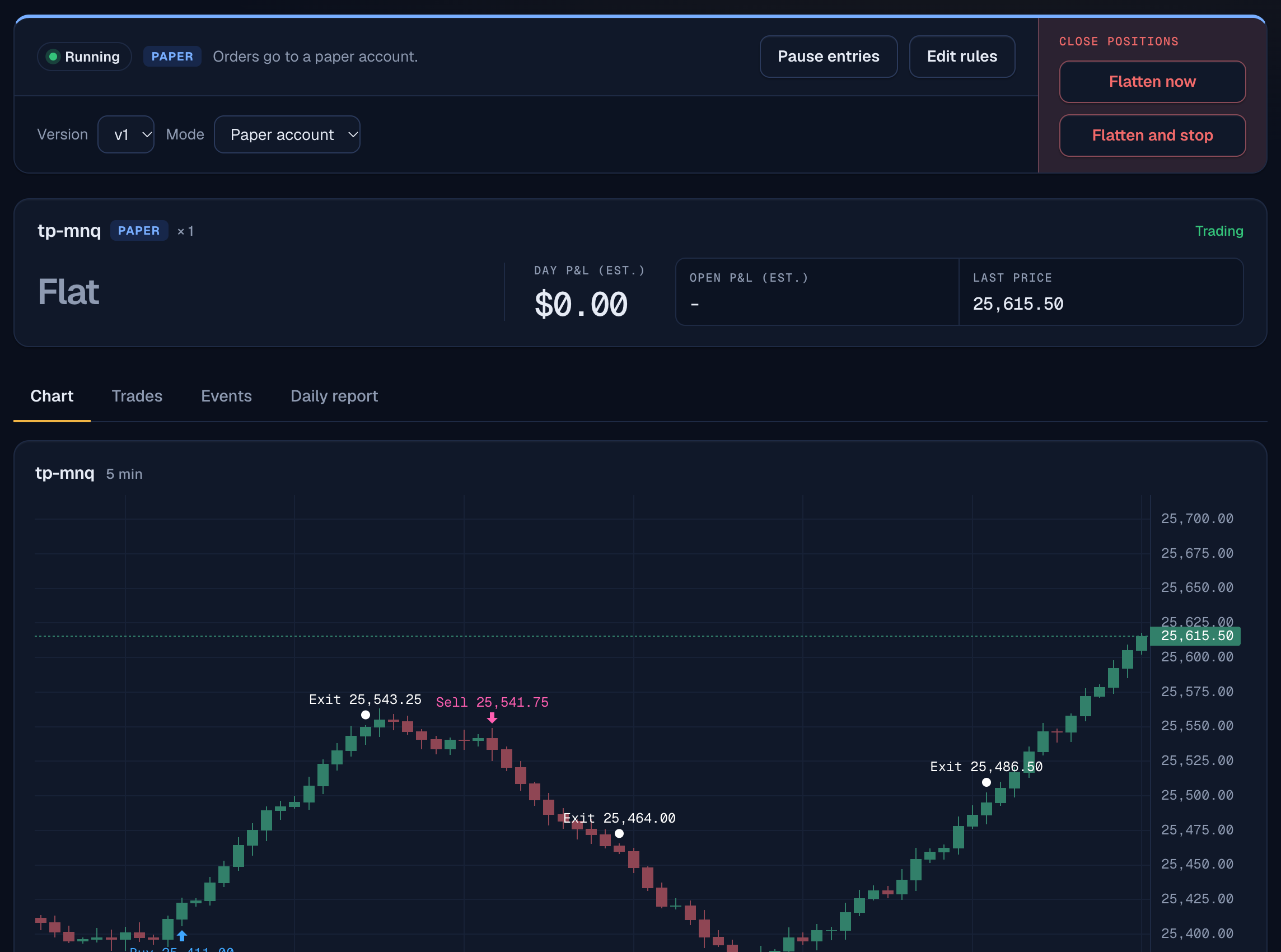
A deployment in AlgoDeskSample data
The AlgoDesk deployment page with sample data: a strategy set to a paper account, its controls, the account, and a price chart with buy, sell and exit markers.
The deployment page: the strategy's state and mode, each account, and every buy, sell and exit on the chart. Sample data from a test copy, not a trading result.
3,034trades matched TradingView's own results exactly, across 6 test strategies
NQ, ES, RTY, YMand their micros, on CME futures
2 order routersTradersPost and PickMyTrade, to Tradovate, Rithmic and prop firm accounts
Order routersTradersPost, PickMyTrade
PlatformsTradovate, Rithmic
Market dataInsightSentry
StrategiesPine Script v5 and v6
Prop firms with setup guidesApex Trader Funding, BluSky, Bulenox, My Funded Futures, Take Profit Trader, Topstep, Tradeify

Each prop firm sets its own rules on automated trading. Check yours before you go live.

How it works

Paste your strategy. AlgoDesk does the rest.

Your strategy runs on AlgoDesk's servers on live prices. When it signals, AlgoDesk tells your order router, which places the order in your own account. AlgoDesk never holds your money.

1

Paste your strategy

AlgoDesk checks your Pine Script right away and tells you exactly what, if anything, it can't run yet. Then it backtests on real prices.

2

Practice

Your algo follows live prices and shows every signal it would send. Nothing is sent anywhere.

3

Paper account

Real orders to a demo or prop firm practice account, so you see real fills without real money.

4

Live

When you're ready, switch to your real account. Live is approved account by account.

Why AlgoDesk

Built for traders who run real accounts

The questions traders ask first, answered straight.

Can one strategy trade several accounts, each its own way?

Yes. Size, contract, flat-by time and loss cap are set per account. No setting up each account by hand.

Does it recover from a missed signal?

Yes. AlgoDesk keeps re-sending where each account should be, so one dropped order doesn't leave you out of sync.

Do trailing stops and partial exits work like in TradingView?

Yes. They run inside AlgoDesk, and matched TradingView trade for trade in our tests.

Can it keep me flat by my prop firm's close?

Yes. Flat by a set time, no new entries after a cut-off, and a daily loss cap, without touching your script.

Can I update my strategy without redoing alerts?

Yes. There are no alerts to rebuild. Every version is kept, and you switch when you choose.

Can I see exactly what it did, and why?

Yes. Every signal is logged, with a daily report per account.

Pricing

Simple monthly plans

Backtests are unlimited on every plan. Limits count what runs at the same time.

Backtest

$19 a month

Try your strategy before it trades.

  • Unlimited backtests
  • Trade-for-trade comparison with TradingView
  • One practice run on live data, no orders sent
Reserve my spot

Runner

$49 a month

Run your strategy on your own accounts.

  • Everything in Backtest
  • 2 strategies running, paper or live
  • Up to 3 accounts, each with its own rules
Reserve my spot

Fan-out

$99 a month

Many prop firm accounts at once.

  • Everything in Runner
  • 10 strategies running
  • Up to 25 accounts
Reserve my spot

Desk

from $299 a month

Trading desks and strategy sellers.

  • More strategies and accounts
  • Members run your algo without seeing its code
  • Set up with you
Reserve my spot

No charge now. Reserving a spot puts you on the early access list; we'll confirm the price before you're ever billed, and design partners use AlgoDesk free during early access. You also pay for your own market data plan and order router.

What you'll need

Three accounts you control

AlgoDesk never holds your money or your broker password. You keep your own accounts, and AlgoDesk tells you which plans fit your setup and roughly what they cost.

  • A market data plan

    Your own InsightSentry key for live prices. Plans start at about $15 a month.

  • An order router

    TradersPost or PickMyTrade turns AlgoDesk's signals into orders.

  • A broker or prop firm account

    Tradovate, a Rithmic broker, or a prop firm such as Topstep or BluSky. Each firm sets its own rules on automation; check yours.

Who it's for

Made for futures traders

Prop firm traders

Run your strategy on evaluation and funded accounts with the firm's daily close and loss limits built in.

Traders with their own broker

Automate the strategy you've already tested, with practice and paper steps before real money.

Strategy authors

Let members run your algo without seeing its code.

Who's behind it

Built by a trader, for traders

Dean Burris

Dean Burris

Founder. Product leader and futures trader.

Dean spent 25 years leading products at Google, Dell and Verizon, then trained in futures through the Axia Futures Career Program and Convergent's Accelerator program. He built AlgoDesk to run his own Pine Script strategies without watching every bar.

Questions go straight to him at dean@algodesk.app.

Questions

Good to know

Is AlgoDesk part of TradingView?

No. AlgoDesk is independent and not affiliated with TradingView. It reads strategies written in Pine Script and runs them on its own servers with its own engine.

Do I need TradingView?

Not to run your strategy. AlgoDesk runs your Pine Script itself, so there are no TradingView alerts to set up, renew or pay for, and no TradingView plan needed. All you need is the strategy's code.

Do I need to know how to code?

No. If you have a Pine Script strategy, paste it in. AlgoDesk checks it and lists anything it can't run yet before you go any further.

Does AlgoDesk hold my money or log in to my broker?

No. Your money stays with your broker or prop firm, and AlgoDesk never asks for your broker login. It sends signals to your order router, and the router places the orders in your account. AlgoDesk has no way to withdraw or move money.

How do you keep my account safe?

Your router webhook and market data key are stored encrypted and never shown again after you save them. Two-factor sign-in is required before any live trading, live is switched on one account at a time, and Flatten now is always one click away. Your strategies stay private: if you share one with members, they can run it without seeing the code.

What will it cost?

Plans start at $19 a month for backtesting and $49 a month to run strategies live, with larger plans for many accounts. You also pay for your own market data plan (from about $15 a month) and order router. Design partners use AlgoDesk free during early access.

Can I use it with my prop firm?

Many prop firms connect through Tradovate, Rithmic or their own platforms. Each firm sets its own rules on automated trading, so read yours first; AlgoDesk links each firm's rules page during setup.

Which markets does it trade?

CME futures, including NQ, ES, RTY and YM and their micros, with more contracts being added.

Does it make my strategy profitable?

No software can promise that. AlgoDesk runs the strategy you give it, exactly as written, and shows its signals, trades and backtests as facts.

When can I start?

We're working with a small group of design partners now and opening to more traders in stages. Join the list and we'll email you when your spot opens.

How do I reach you?

Questions about AlgoDesk or your account: support@algodesk.app. Running a desk, selling algos or talking partnerships: sales@algodesk.app.

Put your strategy to work

Join the early access list. We'll let you know as soon as there's a spot for you.

Get early access

Selling strategies? AlgoDesk for sellers. Running a desk? Email sales@algodesk.app.